Designing account-based ordering, loyalty, and payments for McDonald's Global Mobile App
Overview
The Goal
Merge customer needs with business requirements by streamlining mobile payments, loyalty point collection, deal redemptions, and post-purchase support within McDonald's Global Mobile App (GMA).
The Challenge
Rethink the full customer journey — from account sign-up and restaurant entry to order corrections and feedback — while staying true to McDonald's brand identity and operating within existing app architecture constraints.
The Solution
An innovative "Badge" system — an unobtrusive modal interface integrating voice and QR code interactions, dynamic animations, and multi-channel access methods (global gestures, widgets, 3D Touch) unified in one reusable module.
Key Outcomes
Integrated Account-Based Ordering
Reframed the value of a McDonald's account to both customers and operations. Simplified access via geofencing-triggered Voice Codes for a frictionless sign-in experience.
See the service design ↓Innovative Animation & Interaction Design
Introduced the Moments Panel animation featuring falling coins that respond to device gestures, encouraging natural interactions like shaking the phone. Created subtle menu animations drawing attention to Payment & Loyalty access without cluttering the interface.
See the in-app access ↓Flexible "Badge" System for Payment & Loyalty
A dual-sided badge combining Loyalty, Payment, Arch Card, and Deal redemption into one reusable module. Multiple states (voice code, QR code, saved payment methods) with on-demand instructions via an accessible "?" icon.
See the badge system ↓Robust Post-Fulfillment Experience
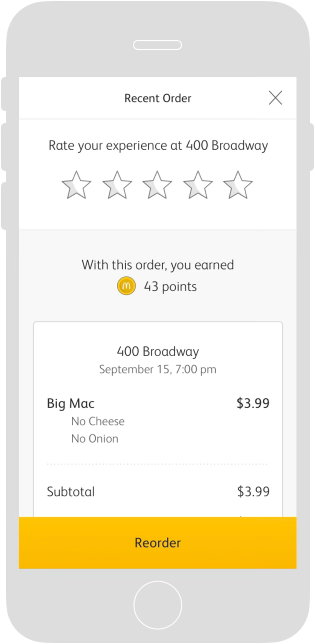
Designed a dynamic eReceipt celebrating loyalty milestones and rewards alongside order details. Incorporated a Help & Support system that streamlines order corrections and directs drive-thru users to in-app support. Established a feedback mechanism (star ratings and Voice Surveys) to capture customer experiences shortly after meal completion.
See the post-fulfillment work ↓Design Principles
01
A Single Check-in Per Visit
- Use GMA only once to redeem a Deal, Pay, and Earn Points (fewer eCP calls)
- No GMA-side aggregation necessary — Pay badge easily added to Deals rather than going two places
- Clean design doesn't add another sidebar menu item; payment is a 'ubiquitous' element
02
Unambiguous for Crew, Secure for Customers
- Crew knows if the check-in occurred but sees no unnecessary account details
- Customer selects their payment method in GMA — consistent with Mobile Ordering experience
- Payments are tokenized, PII is avoided, app can incorporate a biometric lock
03
Add Surprise and Delight
- Rewards don't need to be selected to be redeemed — providing an opportunity for delight
- Payment and Loyalty check-in are relatively hands-free
- A single check-in minimizes friction and wait time for customers
- Increase feedback by making the Voice Survey more accessible
04
Speed Up the Drive-Thru
- Voice-code check-in and single check-in minimize Payment step
- Post-fulfillment Help speeds up DT, confirming order in pull-forward
- All PODs — customer can check in on a SOK for Deals, Rewards, and Pay all in one scan
- Arch Card integration takes priority over other Saved Payment Methods to reduce interchange fees
Service Design
Mapping the problem space before designing.
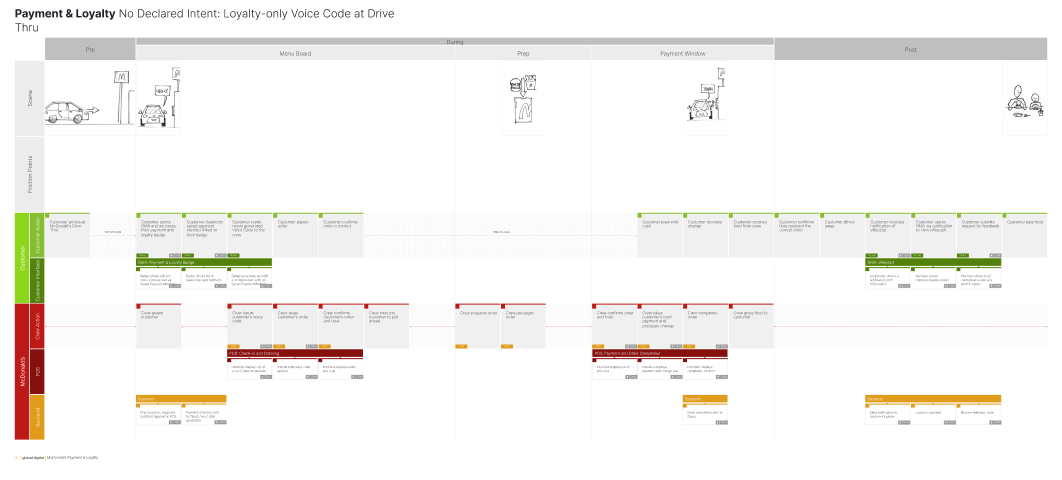
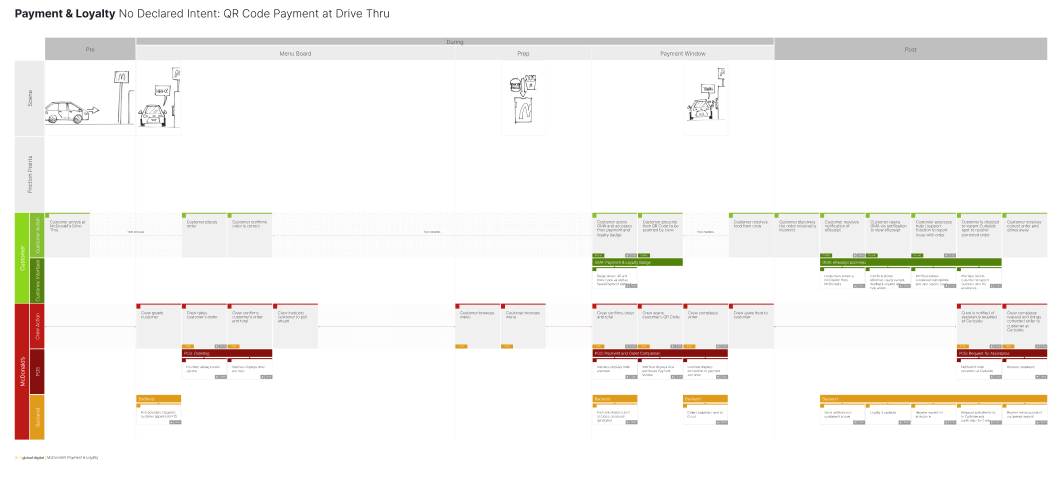
The goal was to understand what having an Account with McDonald's meant from a customer perspective, then turn that meaning into a design that is easy to execute for both the customer and the operators. This started with creating many service design blueprints to map all the processes and touchpoints.
Technical layer — Geo-fencing & Business Model
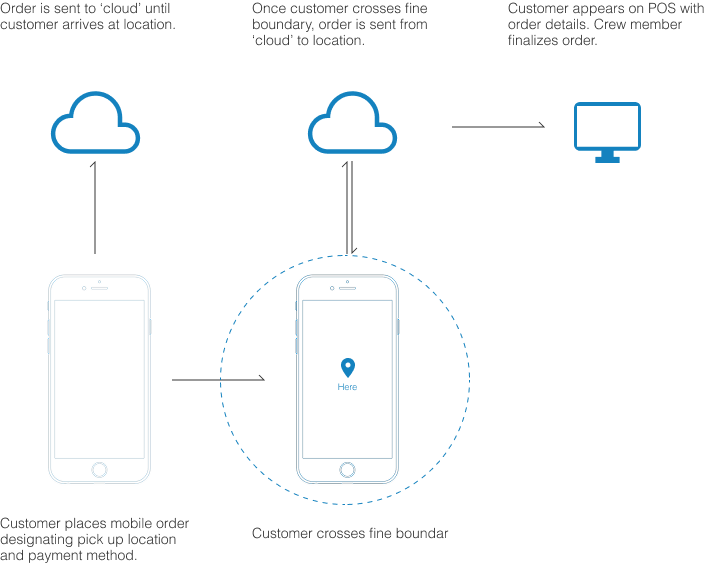
Before designing the Badge interaction, we had to redefine the business model for what type of customer information is passed to a location based on when and where a customer is — and determine specific triggers to comply with legal requirements. The core split: customers who pre-declare intent (Mobile Order) versus those who arrive on-site without it.
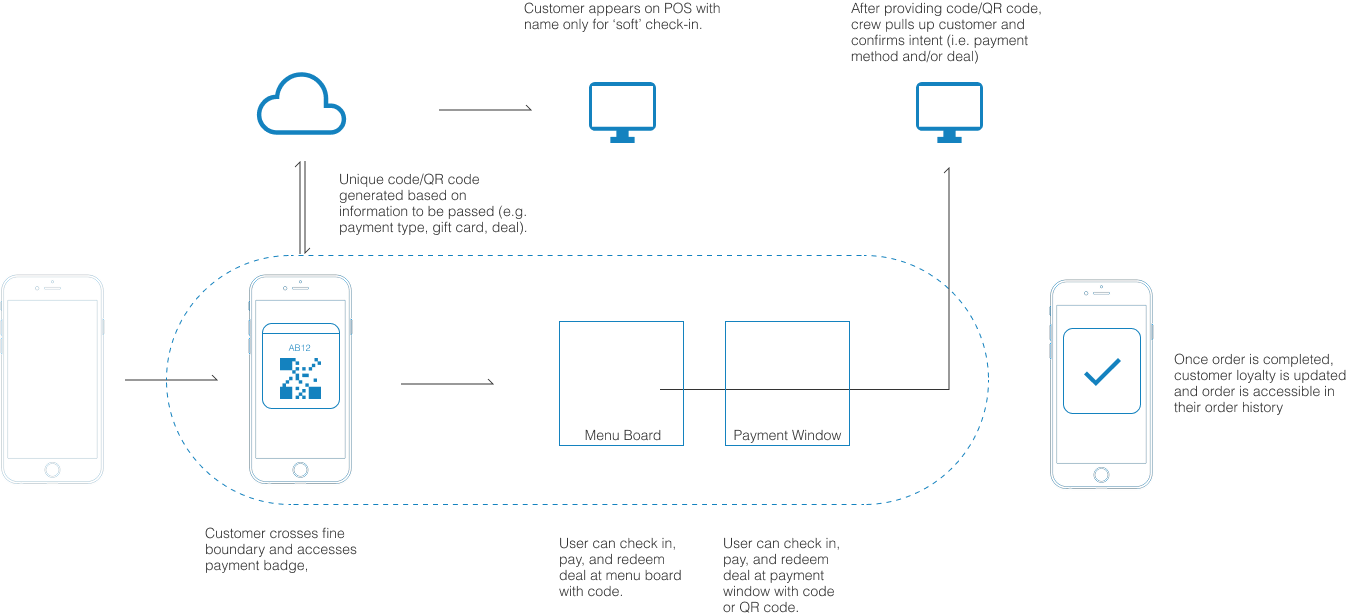
Mobile Order — Declared Intent
Customer pre-identifies; location receives account data on arrival
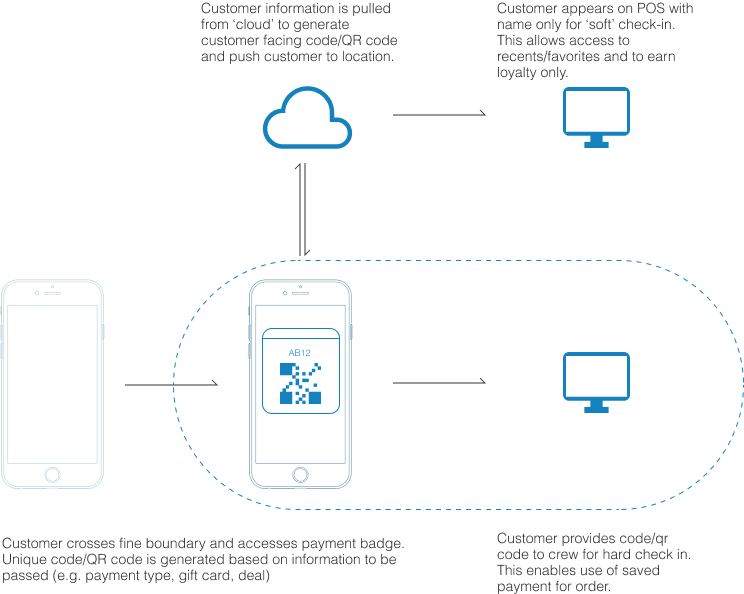
On-Site Order — No Declared Intent
Customer arrives without pre-ordering; geo-fence triggers Badge access prompt
Ubiquitous access to Earn & Pay
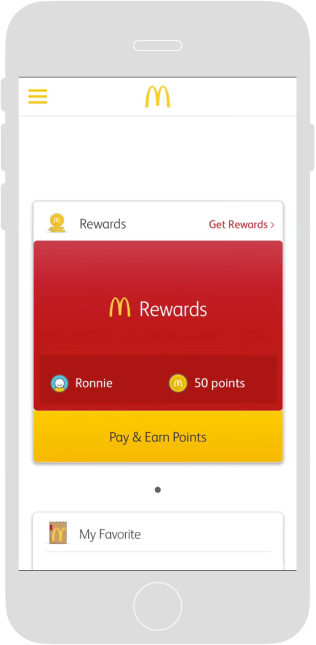
The goal was to provide users with a simple, ubiquitous method for quickly accessing the means to earn Loyalty Points and pay anywhere within GMA, in addition to more traditional points of access throughout the app.
A new Moments Panel experience welcomes users when they open GMA at a restaurant. Falling coins respond to the device's accelerometer — a delightful cue that the app is responsive to gestures, encouraging users to shake their phone to invoke the Badge.
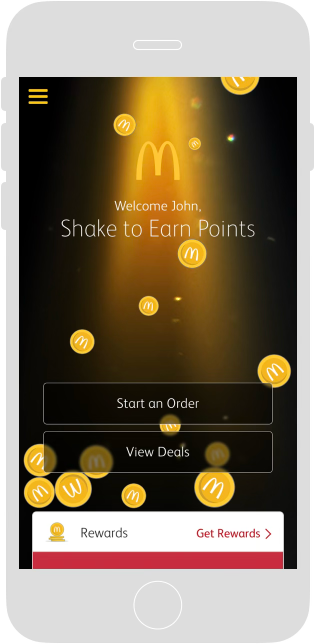
Gesture Access — Shake to invoke Badge
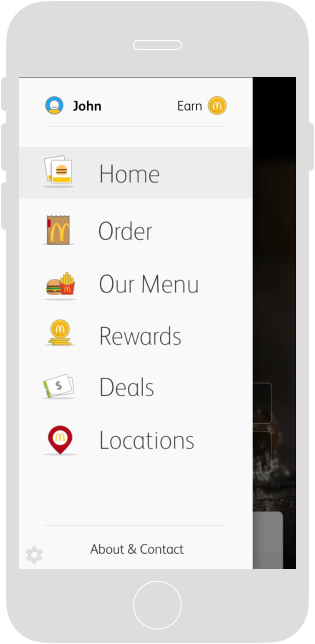
Loyalty — Animated Earn button
Pay — Coin flips between Earn and Pay
Brand Identity
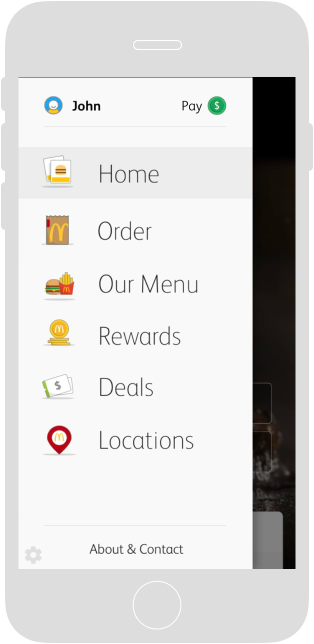
Hard business and technical constraints meant we could not modify the main navigation — adding a dedicated item for Account, Loyalty, Payment, or Deals was off the table. The menu structure was fixed.
Because of this, we had to get creative. We developed a unified identity for Account, Loyalty, Payment, and Deals that could live within the global menu — recognizable at a glance, accessible from anywhere, and fully within the constraints we were given. Each element informed the other: the menu limitations shaped the Badge concept, and the Badge concept shaped how identity needed to show up in the menu.
The Badge modal concept was selected for its unobtrusive accessibility anywhere within the app in addition to its flexibility in accommodating all the user's needs (e.g., Loyalty, Payment, Arch Card, Deals) within a single Voice or QR Code.
Account · Earn
Payment · Deals
Payment & Loyalty Badge
One module. Every need.
Why the Badge modal concept?
The Badge modal was selected for its unobtrusive accessibility anywhere within the app, and its flexibility in accommodating all user needs — Loyalty, Payment, Arch Card, and Deals — within a single Voice or QR Code.
The research question around presenting Voice and QR Code options was one of our toughest design challenges. We see benefits to the customer and business in bringing the self-identification step forward during order taking rather than at payment.
Technical layer — Badge Business Driver
Based on our competitive and comparative audit, the consensus was that a QR code was the most conventional method to identify and use a contactless payment method. However, for this testing sprint, our recommendation was overruled by the client — we had to 'push' the alphanumeric code on the customer and de-emphasize the QR code. Despite our objections, we documented our thinking and the specific business rationale behind the decision.
01
Order Accuracy
When ordering, the customer can give the offer code and the order contents and total will be accurate on the COD. The offer details display on the POS for the crew to ensure the order meets offer conditions — the customer can be confident the offer worked before reaching the pay window.
02
Speed of Service
With alphanumeric code at the speaker, the correct offer is applied at time of ordering — no late additions or changes at the pay window when the QR is scanned. Late changes at the pay window have negative impacts on all customers in the lane.
03
One-Step Routine
Alphacode at the COD is consistent with Mobile Order and Pay. The customer will not have to repeat their offer details twice. Today they tell the order taker at the speaker, but that crew person cannot take any action — then the customer shows the offer again at the cashier window.
04
Personalization
Self-identifying at the order point enables the order taker to greet the customer by name. In the future — recents, favorites, and personalized menu boards become possible once the customer self-identifies at the order point.
05
Ease of Use — Customer
Customer doesn't need to hold their device out of the car window. Once the voice code is given at the order point, the phone can be put away — making the experience feel more hands-free. Easier for passengers to convey a voice code in group-ordering scenarios.
06
Ease of Use — Crew
Crew behavior in the drive-thru already favors manual entry of QR code digits — more reliable than scanning hardware, no scanner cable needed, no worry about brightness or glare on the customer's device. At times of minimal staffing, removing the scan task from the cashier enables crew to multi-task more effectively.
Badge designs and flows
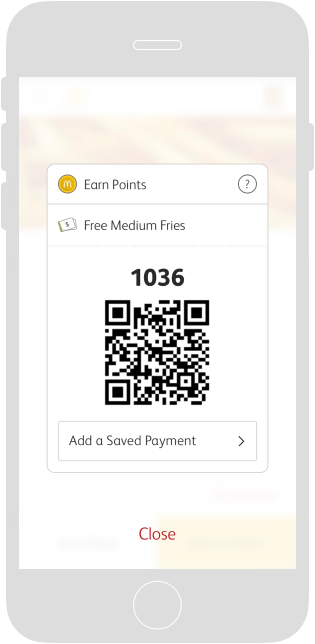
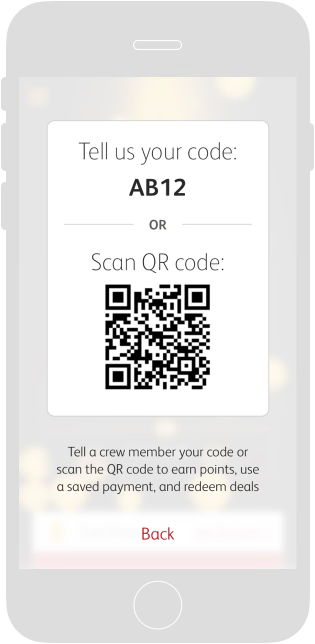
The Badge has two sides: the front for displaying your Voice and QR Code, the back for setting your Payment Method and applying Arch Card balance. Upon selection, the Badge flips back to indicate the new settings. Additional instructions are accessible from the "?" icon.
Initial State
Loyalty Earn States
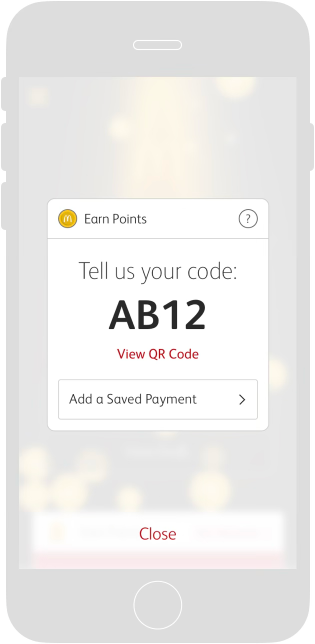
Voice Code · Earn
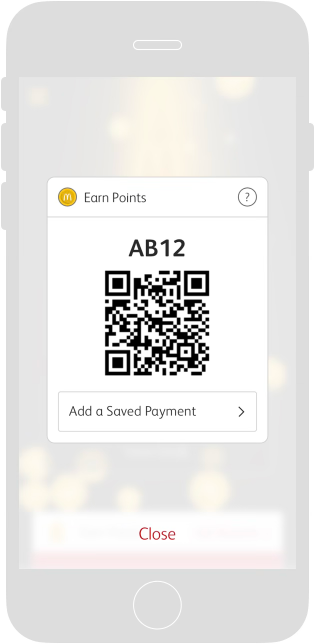
QR Code · Earn
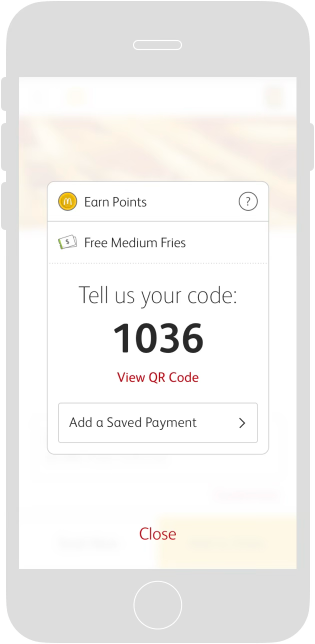
Voice Code · Earn + Deal
QR Code · Earn + Deal
Payment States
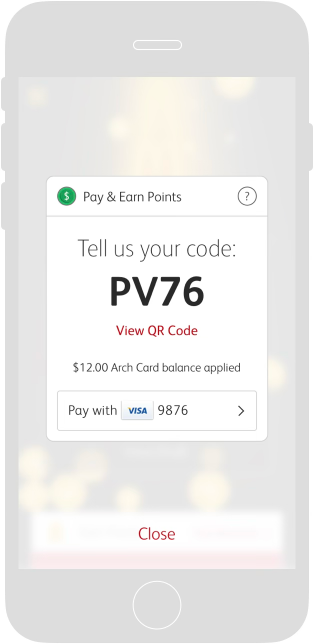
Voice Code · Pay
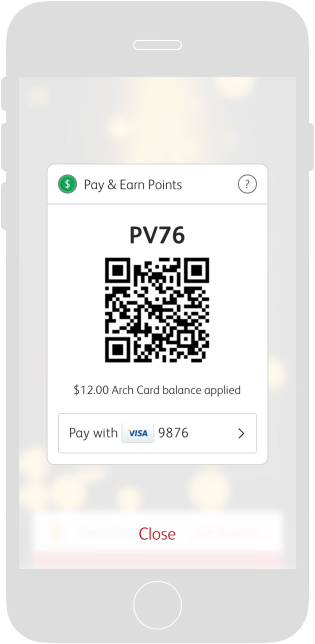
QR Code · Pay
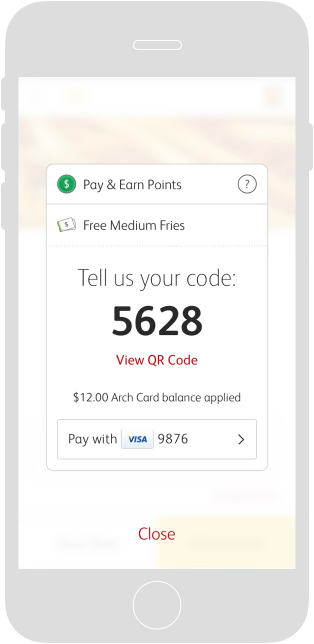
Voice Code · Pay + Deal
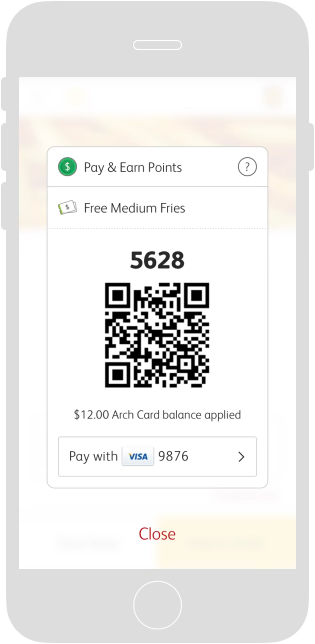
QR Code · Pay + Deal
Payment Selection & Edge Cases
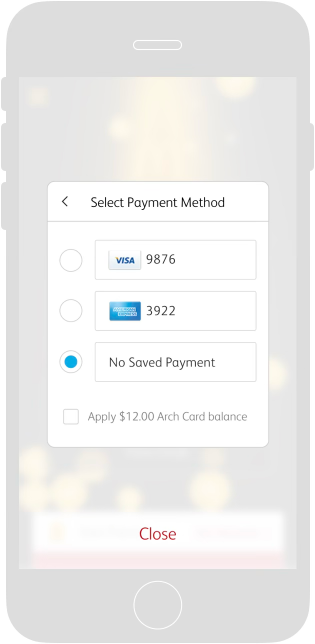
Payment Select
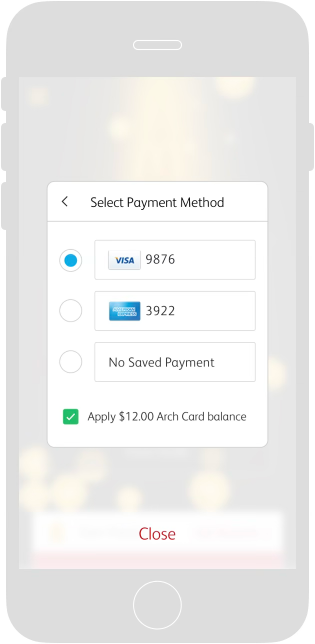
Arch Card
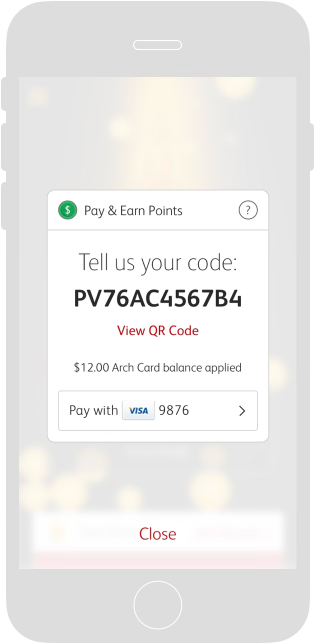
Voice Code · No Geofence
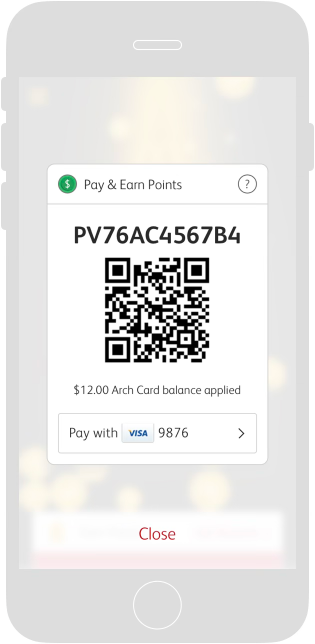
QR Code · No Geofence
Instructions
Post-Fulfillment Experience
Closing the loop after every transaction.

eReceipt
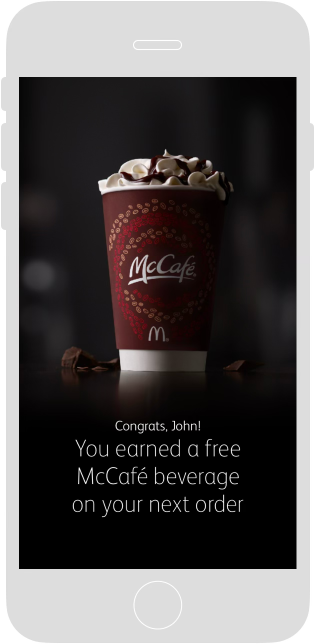
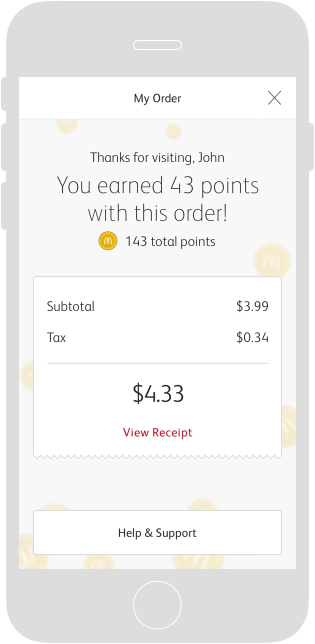
Accessed from the Payment Notification, the eReceipt was designed to serve three main purposes:
- 1. Provide loyalty feedback by celebrating milestones and redemption of Rewards
- 2. Provide summary of purchase cost with ability to view full itemized receipt
- 3. Provide access to Help & Support based on proposed business models
eReceipt States
Reward milestone
Summary
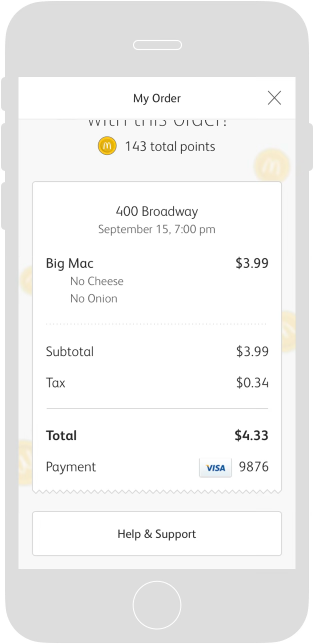
Full itemized receipt
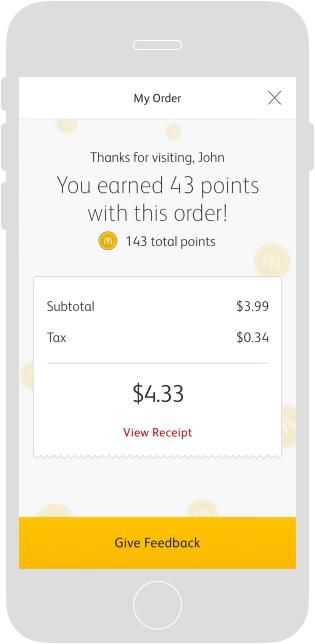
Give feedback

Help & Support
Accessible from the eReceipt to efficiently correct ordering errors, address common customer needs, and speed up the Drive-Thru by directing those in need out of the way to a numbered parking spot where crew members can assist them.
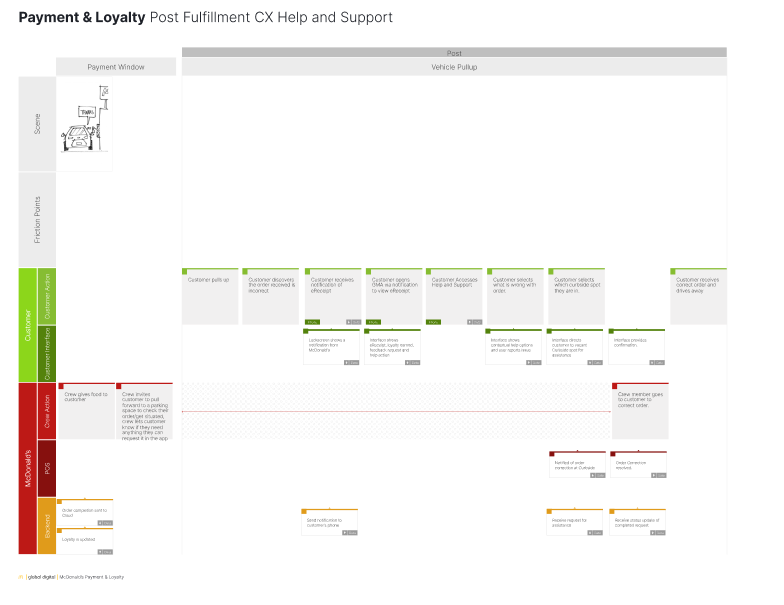
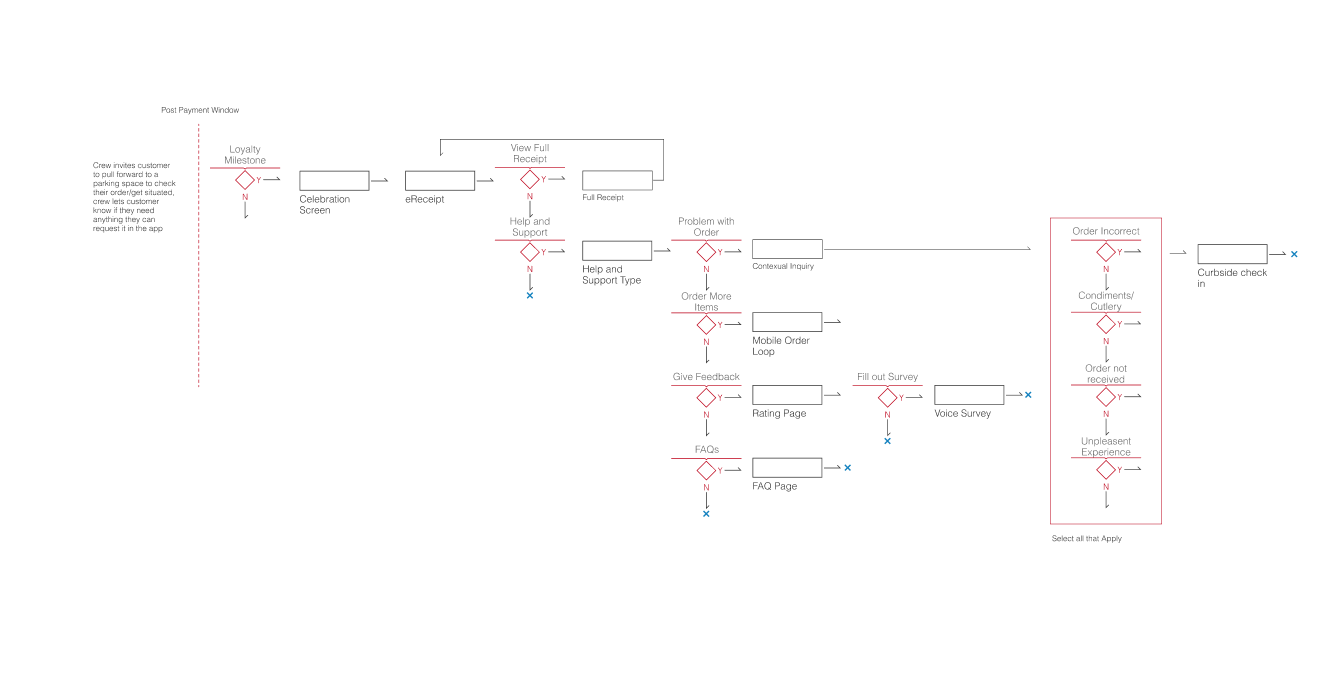
Help & Support States
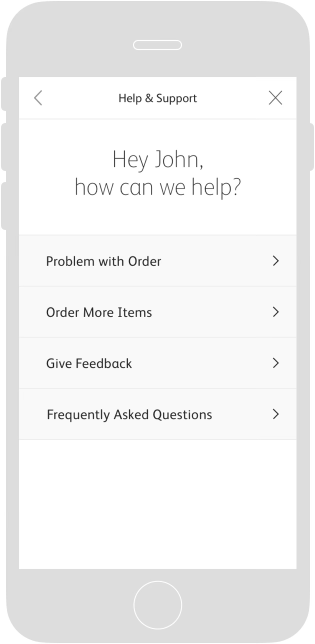
Start
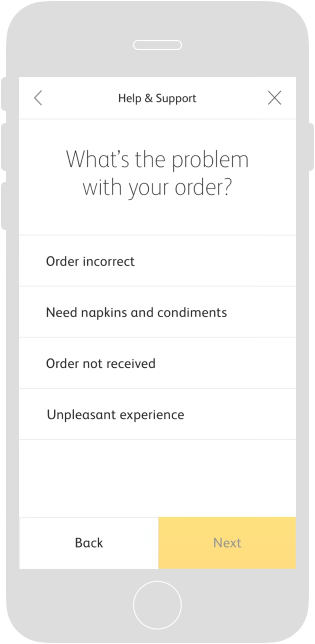
Select problem
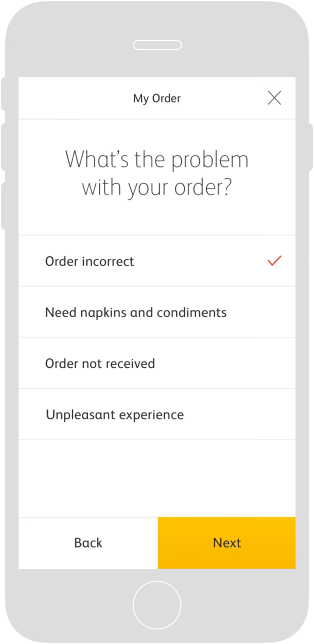
Problem selected
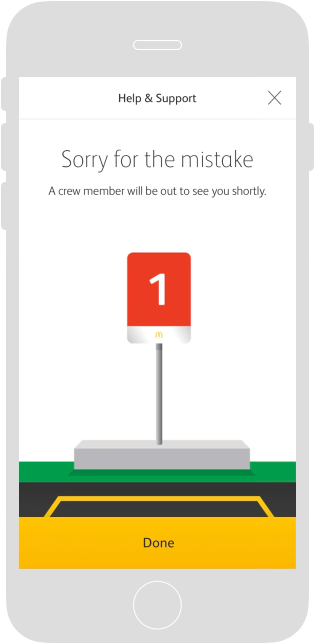
Confirm
Feedback
Voice Survey & Star Rating
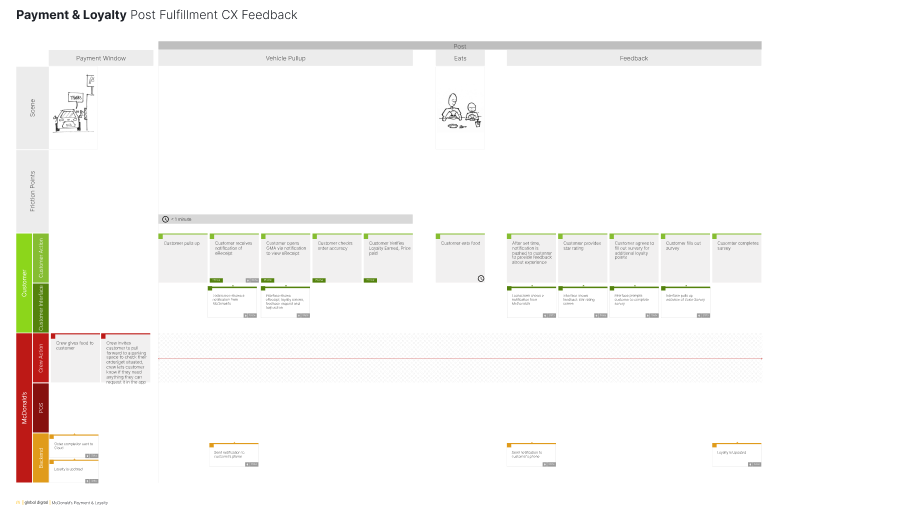
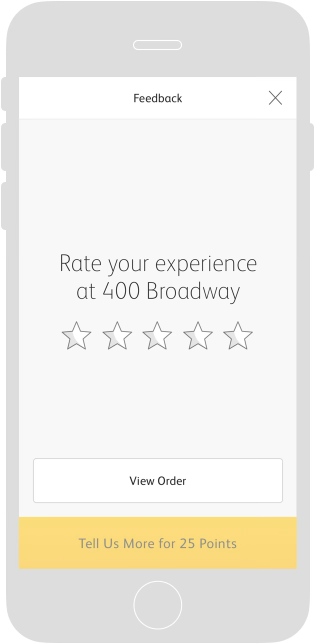
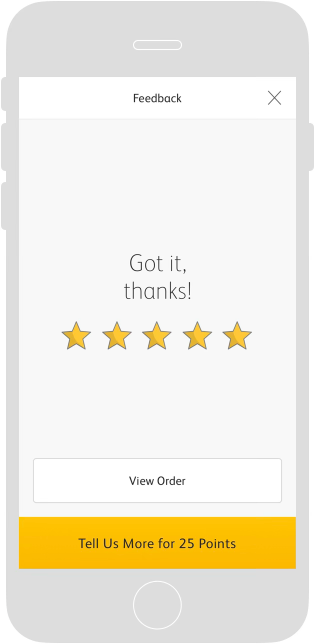
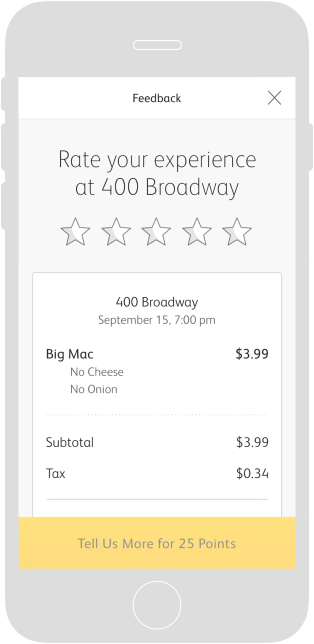
A Feedback Notification is sent after customers have had a chance to enjoy their meals — capturing feedback on the entirety of their experience. After quickly submitting a star rating, customers are encouraged to provide more detail via a link to the McDonald's Voice Survey for additional Loyalty Points.

Technical layer — Post-Purchase Notification Cadence
Each notification touchpoint is triggered by fine-boundary geo events — specifically on-site detection at the menu board and payment window — to ensure timing is contextually relevant rather than arbitrary. The model below defines exactly what is surfaced and when.
| Time since purchase | Customer Access | Payment Notification | Feedback Notification | Order History |
|---|---|---|---|---|
| Immediate < 1 hour | eReceipt with Help & Support | ✓ Payment Notification | ✓ Feedback Request | ✓ eReceipt with recorded feedback |
| < 3 Days | eReceipt with feedback request | — | ✓ Feedback Notification | ✓ eReceipt with recorded feedback |
| 3–7 Days | eReceipt with feedback request | — | — | ✓ Order History |
Notification cadence triggers are tied to fine-boundary geo events (on-site detection) at menu board and payment window touchpoints, ensuring timely and contextually relevant post-fulfillment communications.
Feedback States
Start
Rating entered
From eReceipt
Order history
Testing & Validation
Three rounds, each one closer to a real drive-thru.
A badge you hold up at a menu board behaves nothing like a badge you tap through on a couch. So testing escalated in fidelity and in realism — from a phone rig on a desk, to a mock drive-thru running live account data, to a real car on a real road. Each round answered a question the previous one couldn't.
01 — In-house guerrilla testing
Does the feature have a home in the app?
We built early interactive prototypes and tested them in-house using a Mr Tappy rig over a handset, capturing screen and hand together. Rounds focused on placement, whether the interactions worked as intended, and how quickly a first-time user learned account-based ordering and payment without instruction.
02 — Mock drive-thru, Chicago lab
Does it hold up against real data and real crew?
After several prototype iterations and stakeholder approval, we rebuilt the prototype inside McDonald's test environment so it ran on actual account and ordering data and processes rather than mocked screens. That build was tested in the mock drive-thru at McDonald's Chicago lab — with crew on the other side of the window, not just participants.
03 — Live drive-thru
Does it work in a real car, in real traffic?
The final prototype was tested in an operating drive-thru with participants in actual vehicles on public roads. For legal and liability reasons the sessions were run by a third-party vendor; I wrote the testing protocol and objectives the vendor executed against, so the study still answered our design questions rather than theirs.
Why escalate rather than test once
Guerrilla testing is cheap enough to run on an idea that may not survive the week — the right tool for placement and learnability. But learnability in a quiet room says nothing about a customer holding up a phone with a car behind them and a crew member waiting. Moving the same design through a mock drive-thru and then a live one meant each round of findings cost what the question was worth, and the expensive real-world test was spent on validation rather than discovery.